
Apologies for not coming up with some more amusing anecdotes in my first post after Christmas, but I’m having a writers block. I do however have a rather lovely iPod touch (called Treacle), which I am experimenting with, and hope to give some feedback on in the near future. Any recommendations for apps, for video editors or just general geeks, would be appreciated in the comments.
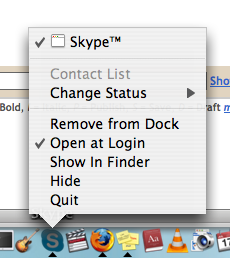
Tiny thing this, but it’s not in the Skype preferences, and if Mac has the equivalent of a preferences menu of apps to start at login, I haven’t found it.
Ctrl+click the Skype icon in the dock and uncheck the “Open at login”.
Kill the Mac caps lock key#
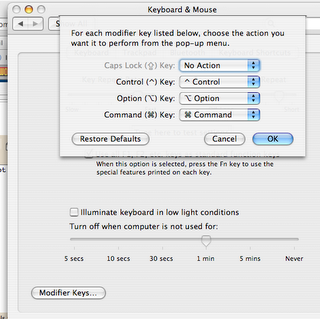
However, if you’re a sloppy typist like me, this simple remedy will make life minutely more pleasing. Which is always a good thing. System preferences -> Keyboard and Mouse -> Modifier keys and make Caps lock Key “No Action”
Screengrabs from VLC on a Windows machine#
Came across this one when reminded that a plain PrntScrn (sp?) then opened in Photoshop, does that odd thing where the VLC window won’t get saved to the clipboard. I don’t really understand technically why that happens, but anyway.
In VLC Preferences -> General video settings -> Video snapshot directory (put something sensible in here so you can find your snapshots when captured. You can also change the type of files saved.
You can also pull stills transparently whilst watching the video using a shortcut. The default Windows shortcut is Ctrl+Alt+S. On Mac it’s Alt+Cmd+s, which didn’t work for me (why not? reserved for a system function?) until I changed it in the preferences. Do this by: Preferences -> Interface -> Hotkeys settings, Check the “Advanced options†box and scroll down to “Take video snapshot†and change it to any key you fancy.